Citation
Not logged in
You must be logged in to upload a dataset. Please log in (upper right) or create an account!.
Submissions in progress
This table has entries for any uploads you have in progress. Click to resume or see more details about the status.
| Share ID | Status | Dataset type | Title | Actions |
|---|
Or start a new submission:
-
Enter metadata
Use the form or provided template to enter metadata for your dataset.
-
Upload dataset
Choose your dataset format and upload directly or provide a supported URL (soon).
-
Build track hub
Setup basic track configuration for Gosling.
-
Dataset processing
Your dataset is processed and checked on the server.
-
Finalize submission
Your dataset gets fully integrated into the system here.
-
Curate dataset
Get the most out of your dataset by doing curation steps here.
Step - Enter metadata (via form OR upload)
The 'metadata' is the data describing your dataset, including things like title, authorship, sequencing protocols used, etc. This is the first step in uploading a dataset to the portal. All data uploaded are initially private to only your account (you can change this later in the Dataset Explorer)
Enter the metadata manually below OR fill out and upload from a spreadsheet template.
Annotation metadata
Contact, organism and instrumentation
Entry not found
If a GEO ID is available, enter it here and the rest can be autofilled.
Personal Identifiable Information
Please check the form above and correct these issues.
Step - Upload dataset
Choose the format of your dataset and upload it here. You can also provide a URL to a supported dataset (soon).
MEX / 3-tab format
These are simple, plain-text files in a bundle, usually compressed with tar/gzip or zip.
Learn more
- MEX info
- MEX example
- 3-tab info
- 3-tab example
MS Excel
Similar in format to 3-tab but rather than individual files each is a different tab in an Excel spreadsheet. Mostly for bulk RNA-seq data as it doesn't initial-scale very well for even medium-sized datasets.
Learn more
- Excel info
- Excel example
RDS / Seurat
This is a binary format used by the Seurat package in R. If you've already been working with your dataset in R, including clustering and other analyses, this is the format to choose.
Learn more
- RDS info
- RDS example
H5AD / Python
Usually created by the Scanpy package in Python, this is a binary format that is very efficient for large datasets. If you've been working with your dataset in Python, this is the format to choose.
Learn more
- H5AD info
- H5AD example
Spatial (in tar format)
Special considerations are needed for spatial datasets, as each platform has a different file requirement. Select a platform below to see specific instructions.
You can also upload in one of the other formats but will not be able to take advantage of special features. This is also an option for spatial data from a platform we currently do not support.
Epigenetic Data
If a UCSC track hub 'hub.txt' file is linked, it and its associated metadata and track files will be cloned to the server. Currently, only BigBed and BigWig files are supported.
Track hub information is converted into a spec that can be read in by the Gosling epigenome viewer.
Learn more
Upload dataset file
Or provide a URL
[Optional] Prepopulate track hub fields
Provide UCSC track hub URL to preload tracks
Or upload a hub.txt file
Select the assembly to associate tracks with.
Required if providing a track hub URL
Hub file contains relative file references
Your hub.txt file contains relative or local file paths that will not be automatically prepopulated.
You will need to upload or link these files manually in the track configuration step after clicking "Configure Trackhub".
Before proceeding, you may want to consider updating your hub.txt file to use "one file" mode so that the track information can be populated if you plan to upload track files.
Step - Build track hub
Please double-check that the hub and track information is correct before proceeding. Contents will be copied over to the server.
Step - Process dataset
Your dataset is being processed on the server. This may take a few minutes, depending on the size of the dataset. You can close your browser at any time and return to the uploader to check on the progress.
Status: Checking ...
Message:
Track Processing Status
Step - Finalize submission
Your dataset has been processed and is ready to be submitted.
Please use the Feedback link on the left and provide this error message:
Steps being performed:
- Storing metadata
- Migrate H5AD file
- Migrate user-uploaded source file
- Migrate primary analysis JSON
- Setting access rights
Step - Curate dataset
Your dataset has been submitted and is now available in the Dataset Explorer.
What is curation?
Right now your dataset is stored in the system but there are no visualizations created so users can explore it. Curation is the process of creating these visualizations, which can include things like bar charts, UMAPs, heatmaps, etc.
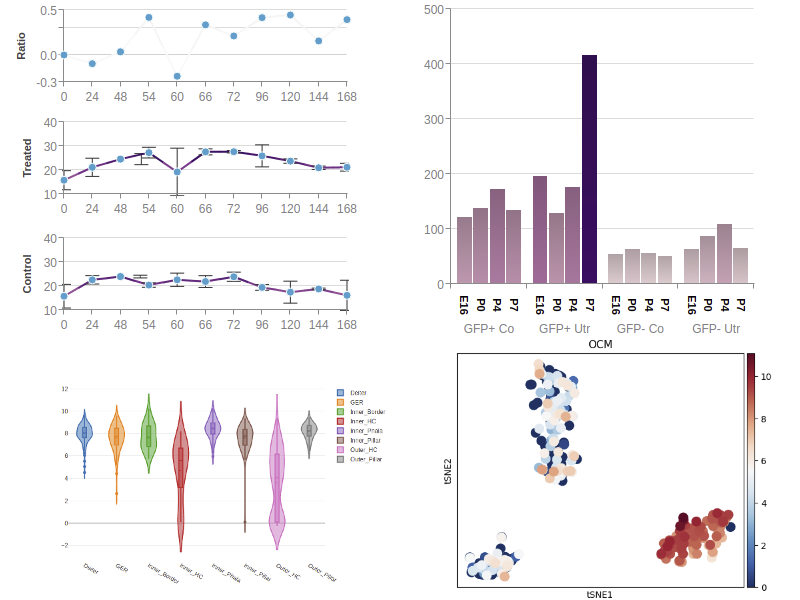
Dataset is ready to view
Click the button to redirect to the gene expression page, where you can view a display after searching a gene.
- (Required) exprMat_file.csv
- (Required) metadata_file.csv
- (Required) fov_positions_file.csv
- (Required) 'CellComposite' directory
- (Required) 'CellLabels' directory
- tx_file.csv
The filenames for the csv files can have an optional dataset id prefix.
Gene IDs present in input must associate with an annotation from the source type indicated in the metadata upload. A tar.gz file containing the following files with these standarized names:
- (Required) 'anndata.h5ad': Counts and metadata file.
- 'cluster_assignment.txt': Cluster assignment file.
- 'Metrics.csv': Metrics file.
- 'variable_features_clusters.txt': Variable features clusters file.
- 'variable_features_spatial_moransi.txt': Variable features Moran’s I file.
Gene IDs present in input must associate with an annotation from the source type indicated in the metadata upload. A tar.gz file containing the following files with these standarized names:
- (Required) 'xlsx' file with information.
- Contain a sheet named "SegmentProperties" with a column named "SegmentDisplayName" which will be used as the cell ID.
- Contain a sheet named "TargetCountMatrix" or "BioProbeCountMatrix" with the counts matrix.
Gene IDs present in input must associate with an annotation from the source type indicated in the metadata upload.
IMPORTANT: We have not implemented polygon spatial shape support yet. Data points are purely from the Excel file. A tar.gz file containing the following files with these standardized names in this directory structure:
- (Required) 'filtered_feature_bc_matrix.h5': Counts and metadata file.
- (Required) 'clusters.csv': Clustering information with both "Barcode" and "Cluster" columns.
- (Required) 'spatial/tissue_hires_image.png': High resolution image.
- (Required) 'spatial/tissue_lowres_image.png': Low resolution image.
- (Required) 'spatial/scalefactors_json.json': Scalefactors file.
- (Required) 'spatial/tissue_positions_list.csv' (SpaceRanger 1) or 'spatial/tissue_positions.csv' (SpaceRanger 2): Spots positions file.
- (Required) 'fullres_image_file': Large microscopy image used as input for space ranger. Not used but needed to not break upload process.
Recommended tar command to create tarball:
tar cvf spatialdata.tar spatialdata_filtered_feature_bc_matrix.h5 clusters.csv spatial
For the "filtered_feature_bc_matrix.h5" file, it needs to be prepended with a prefix and underscore. The prefix "spatialdata_" is used in the example tar command.
For the "clusters.csv" file, it is preferable if the"Cluster" column has actual annotation labels instead of numbers from the output. This provides more value to other users. A tar.gz file containing the following files with these standardized names in this directory structure:
- (Required) 'binned_outputs/square_008um/filtered_feature_bc_matrix.h5': Counts and metadata file.
- (Required) 'clusters.csv': Clustering information with both "Barcode" and "Cluster" columns.
- (Required) 'binned_outputs/feature_slice.h5': Feature slice file.
- (Required) 'binned_outputs/square_008um/spatial/scalefactors_json.json': Scalefactors file.
- (Required) 'binned_outputs/square_008um/spatial/tissue_positions.parquet': Spots positions file.
- (Required) 'binned_outputs/square_008um/spatial/tissue_hires_image.png': High resolution image.
- (Required) 'binned_outputs/square_008um/spatial/tissue_lowres_image.png': Low resolution image.
More information on Visium HD outputs can be found here: https://www.10xgenomics.com/support/software/space-ranger/latest/analysis/outputs/output-overview#hd-outputs
Recommended tar command to create tarball:
tar cvf spatialdata.tar binned_outputs/feature_slice.h5 clusters.csv binned_outputs/square_008um
For the "clusters.csv" file, it is preferable if the "Cluster" column has actual annotation labels instead of numbers from the output. This provides more value to other users.
Special note: We have observed that bin sizes finer than 8 microns per pixel will generally have more cells, which can lead to longer and more intense computes. For now, we use the "square_008um" binned output. A tar.gz file containing the following files with these standardized names in this directory structure:
- (Required) 'experiment.xenium': File containing specifications.
- (Required) 'cell_feature_matrix.h5': File containing cell feature matrix.
- (Required) 'cells.parquet': File containing cell metadata.
- (Required) 'morphology_focus.ome.tif': File containing morphology focus or a "morphology_focus" directory containing multiple images.
- 'nucleus_boundaries.parquet': Polygons of nucleus boundaries.
- 'cell_boundaries.parquet': Polygons of cell boundaries.
- 'transcripts.parquet': File containing transcripts.
- 'cells.zarr.zip': Zarr file containing cell and nucleus label data (NOT USING FOR NOW)
- 'clusters.csv': Clustering information with both "Barcode" and "Cluster" columns.
More information on Xenium outputs can be found here: https://www.10xgenomics.com/support/software/xenium-ranger/latest/analysis/outputs/XR-output-overview
For the "clusters.csv" file, it is preferable if the "Cluster" column has actual annotation labels instead of numbers from the output. This provides more value to other users.